
WRTG 11100: Representing the Real
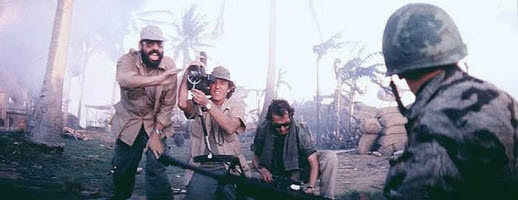
From Apocalypse Now: The film's real director Francis Ford Coppola impersonates a journalist instructing soldiers not to react to the camera as he attempts to document the reality of a military offensive in this fictional movie about an actual war.
Representing the real in words or images, in your own or other people's heads, can be a tricky concept to isolate. Below are some suggested Subject Headings that will retrieve IC Library resources. Many of these categories are very broad, so be prepared to scan.
Conceptual Reality:
Objectivity
Facts (Philosophy)
Reality
Realism
Naturalism
Truth
Certainty
Belief and doubt
Enemies of Objectivity:
Perspective
Perception
Selectivity (Psychology)
Projection (Psychology)
Prejudices
Subconsciousness
Subliminal perception
Errors
Errors, Popular
Self-deception
Irrationalism (Philosophy)
Delusions
Illusion (Philosophy)
Journalism as Representational Reality:
Journalism
Journalism--Authorship
Journalism--Objectivity
Journalism--Objectivity--United States
Journalism--United States--Objectivity
Journalistic errors
Journalism--Philosophy
Feature writing [a "feature" is a journalistic account of something]
Journalism, Scientific
Journalism--Social aspects
Journalistic ethics
Sports journalism
Reportage literature, American--History and criticism
Reporters and reporting
Reporters and reporting--United States
Investigative reporting
Investigative reporting--United States
Prejudices in the press--United States
Mass media--United States--Objectivity
Authorship: Science, Social Science and History:
Authorship
Technical writing
Technical writing--Handbooks, manuals, etc
Medical writing
Medical sciences--Authorship
Ecology--Authorship
Natural history--Authorship--Study and teaching
Science news
Social sciences--Authorship
Communication in the social sciences
Business writing
Academic writing
Textbook bias--United States
Historiography [the authorship of historical writings]
Historiography--History
History--Philosophy
Biography as a literary form
Autobiography--Authorship
Travel writing
Rhetoric and Reality:
English language--Rhetoric
Rhetoric
Rhetoric--Philosophy
Description (Rhetoric)
Exposition (Rhetoric)
Bias-free language
Narration (Rhetoric)
Discourse analysis, Narrative
Communication and culture
Formatting the Factual:
Report writing
Report writing--Handbooks, manuals, etc.
Essay--Authorship
American prose literature--20th century--History and criticism
American prose literature--History and criticism
Realism in literature
Lights, Camera, Reality:
Photojournalism
Documentary films--Authorship
Documentary films--History and criticism
Documentary films--Production and direction
Documentary films--United States
Documentary films--United States--History and criticism
Realism in motion pictures
Realism on television
Reality television programs
Conceptual Reality:
Objectivity
Facts (Philosophy)
Reality
Realism
Naturalism
Truth
Certainty
Belief and doubt
Enemies of Objectivity:
Perspective
Perception
Selectivity (Psychology)
Projection (Psychology)
Prejudices
Subconsciousness
Subliminal perception
Errors
Errors, Popular
Self-deception
Irrationalism (Philosophy)
Delusions
Illusion (Philosophy)
Journalism as Representational Reality:
Journalism
Journalism--Authorship
Journalism--Objectivity
Journalism--Objectivity--United States
Journalism--United States--Objectivity
Journalistic errors
Journalism--Philosophy
Feature writing [a "feature" is a journalistic account of something]
Journalism, Scientific
Journalism--Social aspects
Journalistic ethics
Sports journalism
Reportage literature, American--History and criticism
Reporters and reporting
Reporters and reporting--United States
Investigative reporting
Investigative reporting--United States
Prejudices in the press--United States
Mass media--United States--Objectivity
Authorship: Science, Social Science and History:
Authorship
Technical writing
Technical writing--Handbooks, manuals, etc
Medical writing
Medical sciences--Authorship
Ecology--Authorship
Natural history--Authorship--Study and teaching
Science news
Social sciences--Authorship
Communication in the social sciences
Business writing
Academic writing
Textbook bias--United States
Historiography [the authorship of historical writings]
Historiography--History
History--Philosophy
Biography as a literary form
Autobiography--Authorship
Travel writing
Rhetoric and Reality:
English language--Rhetoric
Rhetoric
Rhetoric--Philosophy
Description (Rhetoric)
Exposition (Rhetoric)
Bias-free language
Narration (Rhetoric)
Discourse analysis, Narrative
Communication and culture
Formatting the Factual:
Report writing
Report writing--Handbooks, manuals, etc.
Essay--Authorship
American prose literature--20th century--History and criticism
American prose literature--History and criticism
Realism in literature
Lights, Camera, Reality:
Photojournalism
Documentary films--Authorship
Documentary films--History and criticism
Documentary films--Production and direction
Documentary films--United States
Documentary films--United States--History and criticism
Realism in motion pictures
Realism on television
Reality television programs
There is no way to anticipate what topics you may ultimately choose. Below is a selection of databases that should be useful across a wide range of subjects.
Comprehensive Databases:
General OneFile : is the most user-friendly of our comprehensive databases, covering almost any topic from a wide range of disciplinary angles and offering lots of full text. Use the default Subject search to find the best subject heading for your topic (and when you find a good one be sure to look at the "Related Subjects" to see if there's something even better).
When you settle on a subject heading, open the "Subdivisions" link below it. Most General OneFile subject searches produce very large retrievals and the "subdivisions" help you narrow your search to a particular aspect: "Economic aspects," "Ethical aspects," "Forecasts and Trends," "History," "Media Coverage," "Political aspects," "Psychological aspects," "Social aspects," and "Statistics," to name only a few.
If the best available subdivision is still too broad, open it and add your own Keywords in the "Search within these results" slot at the upper left.
User Advisory: When first viewing your retrievals in General OneFile, note that you are seeing only the "Magazines" (popular articles) and must click on the tabs for "Academic Journals" (scholarly articles) or "News" (newspaper articles) to see those results.
ProQuest Research Library : is another comprehensive database with substantial full text. Use the "Thesaurus" (above the search slots) to preview what Subject Headings are available. Subect searching can be a more efficient way to search than with only Keywords, since it guarantees that the articles retrieved actually be about the Subject--not just use a particular word.
Note that to the right of your search results you can limit your retrieval by "Source Type" (including Magazines, Newspapers, Scholarly Journals), "Document Type," (including Cover Story, Editorial, or Interview), "Document Feature" (including Photographs, Illustrations), and "Location."
Above each set of articles you retrieve ProQuest will display related Subject searches to help either broaden or narrow your focus.
User Advisory: ProQuest is fussy about entering Subject searches in the designated search slot. If your subject is a person, enter the name--last name first--in the "Person" slot; if a named group of any kind--Microsoft, the Catholic Church, Radiohead, the New York Mets--enter it in "Co/Org"; if a place enter it in "Location."
Academic Search Premier Comprehensive subject coverage with considerable full text. Note that there is a “Subject Terms” link just above the search boxes, allowing you to search the index of Subject Headings--often a good first stop for more efficient Subject searching whereby you are guaranteed that your topic is indeed a main subject of the articles retrieved.
New York Times (1851-2009) gives access to the full text of the New York Times 1851-2007. Click the "Continue" button and at the home page reset the default search of "citation and document text" to "citation and abstract" (since this is a Keyword search of 100% full text, you are likely to generate too many passing mentions of your search terms if you search all the text; first try the more focused "citation and abstract" search and only broaden it to "document text" if you retrieve too few hits).
Use the "date range" limits to target the primary sources available here--contemporary/eyewitness reports. Without a date range limit you may retrieve hundreds of articles written decades after the events they discuss. For example, a search on "Lincoln" with a date range limit of 11/07/1860--11/10/1860 will target the Time's original coverage of the election of Abraham Lincoln.
User Advisory: when searching for materials from earlier eras, be aware that language changes over time. For example, the term "African American" was not used prior to the 1970s, so when searching for articles on race relations in America prior to 1975, the terms "Negroes or Blacks" will be needed to retrieve relevant newspaper stories.
JSTOR : covers a wide range of scholarly journals in most disciplines, always beginning with the first issue of each one. This provides 100% full text access to articles from not only the first half of the 20th century but even the second half of the 19th. Be aware, however, that at the other end of the date range articles don't appear in JSTOR until at least 2-3 years after publication. Also be aware that for 100% full text you must change the setting from "include links to external content" to "include only content I can access."
JSTOR offers only a Keyword search of its complete full text, so retrievals are large, but the relevancy ranking does a good job of putting the strongest matches on the first few pages. This relevancy ranking does not weigh date, however, and will display a mix of articles written decades apart. So if your topic is time sensitive, be alert to publication dates.
User Advisory: The academic journals covered here feature numerous book reviews, so it's a good idea to tic the "Article" limit below the search slots so you won't be overwhelmed by book reviews on your topic.
Also note the "Date Range" limit, which in a database with an archive this deep can be very useful.
Discipline-Specific Databases:
Communication Source : Use the Thesaurus above the search slots to browse available Subject Headings. Once you find one, "explode" it by double clicking and scan all the related Headings.
PsycINFO : The American Psychological Association use their own Subject vocabulary (called "Descriptors"), so a visit to the "Thesaurus" below the search slots is a good idea. If you find an article on exactly what you want, be sure to check the assigned "Descriptors" on the right of the citation for more ideas about useful search terms.
PsycINFO deals only with scholarly literature, much of it assuming a graduate-level understanding of the discipline. But among these you may find interesting, accessible articles on your topic.
User Advisory: If what you're searching for are "journal articles only" in "English," it's a good idea to check those boxes (below the search slots).
SocINDEX with Full Text : As the name implies, an excellent database for social issues. Click on the "Subject Terms" link above the search slots to find which Subject Headings will work here. Double click any Heading for a list of broader, narower, and related Subject Terms. And note that you can check the boxes to select as many Headings as you like and then "add to search using or" and run the search--all without even retyping the terms back on the home page.
ScienceDirect : Because it’s a large database with a great deal of full text, the absence of Subject searching means that your Keyword searches will often retrieve large sets of articles, many of which mention but don’t discuss your search term(s). One way around this is to limit your initial search to the “Abstract Title Keyword” field. Once you have found an article that sounds on-target, click the “Related Articles” link beneath the citation This will open a range of articles on the same topic.
User Advisory: Don't settle for the default "Quick Search"--open "Search" for the full range of options. Among these you can uncheck "All books," which is recommended if you're looking for articles. And if you open the "Dates" drop-down menu you'll find a much wider range of options than the default 10 year span.
CINAHL is a health literature database with excellent resources and a very helpful search interface--if you know how to approach it. Whatever your topic, first find the "CINAHL Headings" for it--the link is at the top left. When you've found the right heading--whether Alzheimer's Disease, Obesity, or Doping in Sports--click on "Explode" to the right for a list of subheadings--among them Diagnosis, Drug Therapy, Ethical Issues, Prevention, Prognosis, Risk factors, Therapy, and Transmission. By ticking any of these boxes you can add them to the main Subject search, which you can then run by clicking "Search Database" at the top right.
Business Source Premier (Special Business Interface) : Our largest database of newspaper, magazine and journal articles on all aspects of business and management. Notice the links for “SWOT Analyses,” “Company Profiles,” and “Industry Profiles” in the right-hand Browse box, as well as a Subjects button, where you can test which Subject headings will work for this database. Also notice all the business-specific Limits you can set if you open the “more options” link at the bottom of the search page: product name, industry code, ticker symbol.
SPORTDiscus with Full Text : Note the Thesaurus above the search slots where you can browse for likely Subject Headings to use in a Subject search. Also note that below the search slots you can limit retrievals by country and language in this international database, as well as by Publication Type--for instance, Journal Article.
Comprehensive Databases:
General OneFile : is the most user-friendly of our comprehensive databases, covering almost any topic from a wide range of disciplinary angles and offering lots of full text. Use the default Subject search to find the best subject heading for your topic (and when you find a good one be sure to look at the "Related Subjects" to see if there's something even better).
When you settle on a subject heading, open the "Subdivisions" link below it. Most General OneFile subject searches produce very large retrievals and the "subdivisions" help you narrow your search to a particular aspect: "Economic aspects," "Ethical aspects," "Forecasts and Trends," "History," "Media Coverage," "Political aspects," "Psychological aspects," "Social aspects," and "Statistics," to name only a few.
If the best available subdivision is still too broad, open it and add your own Keywords in the "Search within these results" slot at the upper left.
User Advisory: When first viewing your retrievals in General OneFile, note that you are seeing only the "Magazines" (popular articles) and must click on the tabs for "Academic Journals" (scholarly articles) or "News" (newspaper articles) to see those results.
ProQuest Research Library : is another comprehensive database with substantial full text. Use the "Thesaurus" (above the search slots) to preview what Subject Headings are available. Subect searching can be a more efficient way to search than with only Keywords, since it guarantees that the articles retrieved actually be about the Subject--not just use a particular word.
Note that to the right of your search results you can limit your retrieval by "Source Type" (including Magazines, Newspapers, Scholarly Journals), "Document Type," (including Cover Story, Editorial, or Interview), "Document Feature" (including Photographs, Illustrations), and "Location."
Above each set of articles you retrieve ProQuest will display related Subject searches to help either broaden or narrow your focus.
User Advisory: ProQuest is fussy about entering Subject searches in the designated search slot. If your subject is a person, enter the name--last name first--in the "Person" slot; if a named group of any kind--Microsoft, the Catholic Church, Radiohead, the New York Mets--enter it in "Co/Org"; if a place enter it in "Location."
Academic Search Premier Comprehensive subject coverage with considerable full text. Note that there is a “Subject Terms” link just above the search boxes, allowing you to search the index of Subject Headings--often a good first stop for more efficient Subject searching whereby you are guaranteed that your topic is indeed a main subject of the articles retrieved.
A good initial strategy in this database is to search a likely topic in the Subject Terms and when you find it “explode” the term by double clicking it--this brings up a list of related Subject terms. You can check as many terms as you like before "adding" them to your search by AND-ing or OR-ing them together.
User Advisory: For any retrieved set of articles, there will be a box displayed on the left that will limit the articles to “Scholarly” journals—just check the box and click the “Update Results” button below.
LexisNexis Academic News: Offering a keyword search of 100% full text from a vast number of national and international newspapers, this is an easy database to use poorly and a bit tricky to use well. In order not to be overwhelmed with articles in which your search terms are mentioned anywhere—first or last paragraph—or any number of times—once or ten times—use commands to target articles in which your topic words are mentioned early or mentioned often.
Use the hlead command (headline and lead paragraphs) to target articles in which your topic words occur in the prime news-story position of headline or first paragraphs. For example: hlead(fracking and pollution) will retrieve just the articles in which the words “fracking” and “pollution” are used in the headline or first paragraphs. Note: the term or terms to which you want this command to apply must be put in parentheses after hlead, with no space between.
Use the altleast command to target articles in which your topic words occur a set number of times. For example: atleast5(“gay marriage”) will retrieve only the articles where this phrase is used at least 5 times—indicating that it must be a main topic. You can plug in any number after atleast—atleast3 or atleast7. Note: the term or terms to which you want this command to apply must be put in parentheses with no space between the number you choose and the first parenthesis.
Use the date range offered under Advanced Options. Because this is a large database of 100% full text, one of the most effective ways to retrieve fewer than 1000 hits is to set up a time frame. Note: if you use the calendar icons to set beginning and end dates, you need to choose a year, a month, and a day for each. Without the day, the date won’t register.
LexisNexis Academic Law Reviews: Offering a keyword search of 100% full text law reviews (publishers of scholarly articles on legal issues), this is an easy database to use poorly and a bit tricky to use well. In order not to be overwhelmed by articles in which your search terms are mentioned in passing but are not the prime focus, use the atleast command to target articles in which your topic words are required to appear at least a certain number of times. For example, atleast5(“gun control”) or atleast7(genes and patents) will retrieve only the articles in which those terms are used repeatedly. Note: the term or terms to which you want this command to apply must be put in parentheses with no space between the number you choose and the first parenthesis.
Use the date range offered under Advanced Options. Because this is a large database of 100% full text, one of the most effective ways to retrieve fewer than 1000 hits is to set up a time frame. Note: if you use the calendar icons to set beginning and end dates, you need to choose a year, a month, and a day for each. Without the day, the date won’t register.
Use the hlead command (headline and lead paragraphs) to target articles in which your topic words occur in the prime news-story position of headline or first paragraphs. For example: hlead(fracking and pollution) will retrieve just the articles in which the words “fracking” and “pollution” are used in the headline or first paragraphs. Note: the term or terms to which you want this command to apply must be put in parentheses after hlead, with no space between.
Use the altleast command to target articles in which your topic words occur a set number of times. For example: atleast5(“gay marriage”) will retrieve only the articles where this phrase is used at least 5 times—indicating that it must be a main topic. You can plug in any number after atleast—atleast3 or atleast7. Note: the term or terms to which you want this command to apply must be put in parentheses with no space between the number you choose and the first parenthesis.
Use the date range offered under Advanced Options. Because this is a large database of 100% full text, one of the most effective ways to retrieve fewer than 1000 hits is to set up a time frame. Note: if you use the calendar icons to set beginning and end dates, you need to choose a year, a month, and a day for each. Without the day, the date won’t register.
LexisNexis Academic Law Reviews: Offering a keyword search of 100% full text law reviews (publishers of scholarly articles on legal issues), this is an easy database to use poorly and a bit tricky to use well. In order not to be overwhelmed by articles in which your search terms are mentioned in passing but are not the prime focus, use the atleast command to target articles in which your topic words are required to appear at least a certain number of times. For example, atleast5(“gun control”) or atleast7(genes and patents) will retrieve only the articles in which those terms are used repeatedly. Note: the term or terms to which you want this command to apply must be put in parentheses with no space between the number you choose and the first parenthesis.
Use the date range offered under Advanced Options. Because this is a large database of 100% full text, one of the most effective ways to retrieve fewer than 1000 hits is to set up a time frame. Note: if you use the calendar icons to set beginning and end dates, you need to choose a year, a month, and a day for each. Without the day, the date won’t register.
New York Times (1851-2009) gives access to the full text of the New York Times 1851-2007. Click the "Continue" button and at the home page reset the default search of "citation and document text" to "citation and abstract" (since this is a Keyword search of 100% full text, you are likely to generate too many passing mentions of your search terms if you search all the text; first try the more focused "citation and abstract" search and only broaden it to "document text" if you retrieve too few hits).
Use the "date range" limits to target the primary sources available here--contemporary/eyewitness reports. Without a date range limit you may retrieve hundreds of articles written decades after the events they discuss. For example, a search on "Lincoln" with a date range limit of 11/07/1860--11/10/1860 will target the Time's original coverage of the election of Abraham Lincoln.
User Advisory: when searching for materials from earlier eras, be aware that language changes over time. For example, the term "African American" was not used prior to the 1970s, so when searching for articles on race relations in America prior to 1975, the terms "Negroes or Blacks" will be needed to retrieve relevant newspaper stories.
JSTOR : covers a wide range of scholarly journals in most disciplines, always beginning with the first issue of each one. This provides 100% full text access to articles from not only the first half of the 20th century but even the second half of the 19th. Be aware, however, that at the other end of the date range articles don't appear in JSTOR until at least 2-3 years after publication. Also be aware that for 100% full text you must change the setting from "include links to external content" to "include only content I can access."
JSTOR offers only a Keyword search of its complete full text, so retrievals are large, but the relevancy ranking does a good job of putting the strongest matches on the first few pages. This relevancy ranking does not weigh date, however, and will display a mix of articles written decades apart. So if your topic is time sensitive, be alert to publication dates.
User Advisory: The academic journals covered here feature numerous book reviews, so it's a good idea to tic the "Article" limit below the search slots so you won't be overwhelmed by book reviews on your topic.
Also note the "Date Range" limit, which in a database with an archive this deep can be very useful.
Discipline-Specific Databases:
Communication Source : Use the Thesaurus above the search slots to browse available Subject Headings. Once you find one, "explode" it by double clicking and scan all the related Headings.
PsycINFO : The American Psychological Association use their own Subject vocabulary (called "Descriptors"), so a visit to the "Thesaurus" below the search slots is a good idea. If you find an article on exactly what you want, be sure to check the assigned "Descriptors" on the right of the citation for more ideas about useful search terms.
PsycINFO deals only with scholarly literature, much of it assuming a graduate-level understanding of the discipline. But among these you may find interesting, accessible articles on your topic.
User Advisory: If what you're searching for are "journal articles only" in "English," it's a good idea to check those boxes (below the search slots).
SocINDEX with Full Text : As the name implies, an excellent database for social issues. Click on the "Subject Terms" link above the search slots to find which Subject Headings will work here. Double click any Heading for a list of broader, narower, and related Subject Terms. And note that you can check the boxes to select as many Headings as you like and then "add to search using or" and run the search--all without even retyping the terms back on the home page.
ScienceDirect : Because it’s a large database with a great deal of full text, the absence of Subject searching means that your Keyword searches will often retrieve large sets of articles, many of which mention but don’t discuss your search term(s). One way around this is to limit your initial search to the “Abstract Title Keyword” field. Once you have found an article that sounds on-target, click the “Related Articles” link beneath the citation This will open a range of articles on the same topic.
User Advisory: Don't settle for the default "Quick Search"--open "Search" for the full range of options. Among these you can uncheck "All books," which is recommended if you're looking for articles. And if you open the "Dates" drop-down menu you'll find a much wider range of options than the default 10 year span.
CINAHL is a health literature database with excellent resources and a very helpful search interface--if you know how to approach it. Whatever your topic, first find the "CINAHL Headings" for it--the link is at the top left. When you've found the right heading--whether Alzheimer's Disease, Obesity, or Doping in Sports--click on "Explode" to the right for a list of subheadings--among them Diagnosis, Drug Therapy, Ethical Issues, Prevention, Prognosis, Risk factors, Therapy, and Transmission. By ticking any of these boxes you can add them to the main Subject search, which you can then run by clicking "Search Database" at the top right.
Business Source Premier (Special Business Interface) : Our largest database of newspaper, magazine and journal articles on all aspects of business and management. Notice the links for “SWOT Analyses,” “Company Profiles,” and “Industry Profiles” in the right-hand Browse box, as well as a Subjects button, where you can test which Subject headings will work for this database. Also notice all the business-specific Limits you can set if you open the “more options” link at the bottom of the search page: product name, industry code, ticker symbol.
SPORTDiscus with Full Text : Note the Thesaurus above the search slots where you can browse for likely Subject Headings to use in a Subject search. Also note that below the search slots you can limit retrievals by country and language in this international database, as well as by Publication Type--for instance, Journal Article.

- Ebrary
- Citation
- Interlibrary Loan
- Plagiarism Tutorial
(log-in required: IC email name/password)
- Truth in Nonfiction : Essays
- Writing Nonfiction: Turning Thoughts into Books
- Fearless Confessions : A Writer's Guide to Memoir
- Art of Friction : Where (Non)Fictions Come Together
- Truth : A Guide
- Truth and its Deformities
- Truth and the Past
- Semiotics, Communication and Cognition : Purely Objective Reality
- Truth and the Absence of Fact
- Holding on to Reality : The Nature of Information at the Turn of the Millennium
- News with A View : Essays on the Eclipse of Objectivity in Modern Journalism
- Hidden Agendas : How Journalists Influence the News
- Politics and the American Press : The Rise of Objectivity, 1865-1920
- Real History: Reflections on Historical Practice
- Value-Free Science : Ideals and Illusions
- Scientific Writing : A Reader and Writer's Guide
- Ideas into Words : Mastering the Craft of Science Writing
- Writing for Science
- Skill and Art of Business Writing : An Everyday Guide and Reference
- Crafting Truth : Documentary Form and Meaning
- Documentary Film : A Very Short Introduction
- Recording Reality, Desiring the Real
- Rethinking Documentary : New Perspectives and Practices
- Autobiographical Documentary in America
- Freakshow : First Person Media and Factual Television
- F Is for Phony : Fake Documentary and Truth's Undoing
BEDELL NONFICTIONOW CONFERENCE: Sponsored by the Iowa Writers Workshop, the Iowa University Library keeps these audio files of keynote speakers.
"Truth, Lies, and Nonfiction": This links to a site hosting the audio file for this lecture by nonfiction wirter Stephen Kimber, as well as a a related Q&A; transcript for the Writers' Union of Canada.
Mayborn Literary Nonfiction Conference: this links to video interviews with past presenters.
Non-Fiction Writers on Writing: from Colorado State University, five non-fiction writers provide video answers to a series of questions about their work. (Requires Windows Media Player.)
"Nonfiction is the New Philosophy": a print interview with Steven Church that appeared in Prairie Schooner.
Truth in Creative Non-fiction: A Debate: 12 essays from a wide range of publications--New Yorker, Slate, LA Times, etc. Note: the paragraph beside each image is not the article: you must click on the numbered title.
"Literary Non-fction: The Facts": Interesting commentary from a group of non-fiction writers.
"The Ever-ShiftingTruth and the Creative Nonfiction Writer’s Journey to Find It": appropriately enough, a personal essay.
Nonfiction Now: An Evening with Helen Garner: video of a presenetation by an acclaimed nonfiction wirter discussing her craft.
"Should the Times by a Truth Vigiilante?": Margaret Sullivan set off a small firestorm in the NY Times a year ago by asking this question. She invited answers, so note that there are over 300 blog responses attached.
Media Bias: from Rehtorica.net, a site devoted to discussing the rhetoric of news reporting. This section on Media Bias begins: "There is no such thing as an objective point of view."
The Truth of Nonfiction: Documentary Filmmakers Panel: Video of panel discussion sponsored by the University of California.
"Lessons of Documentary: Reality, Representation, and Cinematic Expressivity": Interesting essay posted by the American Society for Aesthetics.
Nothing But The Truth And The Whole Truthiness: Examining Markers Of Authenticity InThe Modern Documentary: A Masters thesis posted by San Jose State University, this could be useful for its definition of terms and its analysis of recent documentaries.
"Truth, Lies, and Nonfiction": This links to a site hosting the audio file for this lecture by nonfiction wirter Stephen Kimber, as well as a a related Q&A; transcript for the Writers' Union of Canada.
Mayborn Literary Nonfiction Conference: this links to video interviews with past presenters.
Non-Fiction Writers on Writing: from Colorado State University, five non-fiction writers provide video answers to a series of questions about their work. (Requires Windows Media Player.)
"Nonfiction is the New Philosophy": a print interview with Steven Church that appeared in Prairie Schooner.
Truth in Creative Non-fiction: A Debate: 12 essays from a wide range of publications--New Yorker, Slate, LA Times, etc. Note: the paragraph beside each image is not the article: you must click on the numbered title.
"Literary Non-fction: The Facts": Interesting commentary from a group of non-fiction writers.
"The Ever-ShiftingTruth and the Creative Nonfiction Writer’s Journey to Find It": appropriately enough, a personal essay.
Nonfiction Now: An Evening with Helen Garner: video of a presenetation by an acclaimed nonfiction wirter discussing her craft.
"Should the Times by a Truth Vigiilante?": Margaret Sullivan set off a small firestorm in the NY Times a year ago by asking this question. She invited answers, so note that there are over 300 blog responses attached.
Media Bias: from Rehtorica.net, a site devoted to discussing the rhetoric of news reporting. This section on Media Bias begins: "There is no such thing as an objective point of view."
The Truth of Nonfiction: Documentary Filmmakers Panel: Video of panel discussion sponsored by the University of California.
"Lessons of Documentary: Reality, Representation, and Cinematic Expressivity": Interesting essay posted by the American Society for Aesthetics.
Nothing But The Truth And The Whole Truthiness: Examining Markers Of Authenticity InThe Modern Documentary: A Masters thesis posted by San Jose State University, this could be useful for its definition of terms and its analysis of recent documentaries.
MLA is the citation style used by most disciplines in the Humanities. MLA revised its style in 2008 in the MLA Style Manual, and these changes have been incorporated in the 7th edition of the MLA Handbook (May 2009). The guides below use the 2008/9 standards.
