
FAQs (click to expand)
During a typical academic year, there are approximately 2800 undergraduate and 450 graduate courses taught at IC. Using 3 texts as the average required for each course, this equals approximately 9750 books. Also, textbooks tend to be frequently updated.
In recent academic years, the Library budget has allowed for the purchase approximately 5,800 new books and ebooks to support the current research needs of all departments and programs on campus.
We do not have the funds to purchase current textbooks, while at the same time supporting student and faculty research needs.
Faculty sometimes place copies of textbooks or chapters from texts on reserve or ereserve. If you’re not sure whether your professor has put your course’s textbook on reserve, search the Reserves site to see what is available.
Please note that, as academic libraries generally do not purchase textbooks, they are not available on interlibrary loan. The IC Library does not fill Interlibrary Loan requests for textbooks in current use at the College.
The Ithaca College Bookstore provides a rental service and sells textbooks. Additional rental/purchase sites:
Amazon (also rents textbooks)
Bigwords.com
BookLookr
BooksPrice
BookRenter
BookSpot: Textbooks
CampusBookRentals.com
CengageBrain
Chegg
CollegeBookRenter.com
Half.com
Open Access Textbooks
OpenStax College
PickTextBooks
SlugBooks
Textbookspy
The Saylor Foundation has opened its Media Library to the public, providing thousands of open educational resources, videos, articles, and full-length textbooks.
- Arabic language films
- Chinese language films (primarily Mandarin)
- Danish Language films
- Farsi (Persian, Iranian)
- French language films
- German language films
- Hebrew language films
- Italian language films
- Spanish language films
Many of the library's subject research guides have a primary source category, for instance:
- History Research: United States - Primary Sources
- Journalism Research: Primary Sources
- Law Research: Primary Sources
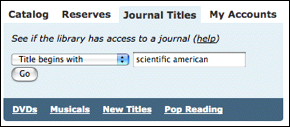
Go to the Library homepage and click on "Journals" in the upper left. Type "Scientific American" into the blank and click "Go."
You will see a long list of ways in which you can gain access to Scientific American content.
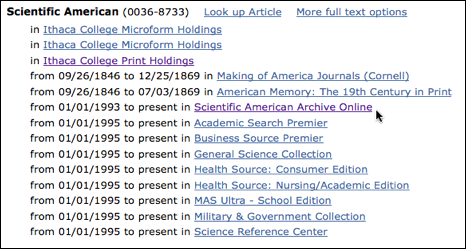
Go to Scientific American Archive Online. This provides coverage back to 1993 with full articles available as PDF files. When you first enter the site, you will see a search blank. If you want to browse by year, click the "Publication" link at the top left of the page,
.png)
then click "Scientific American."
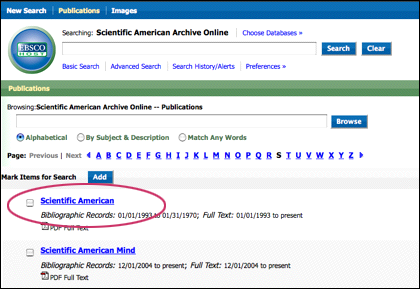
You will see a browsable list of years on the right-hand side of the page.
.png)
For material prior to 1993, see our microfilm holdings at T1 .S5. These extend back to 1949.
Finally, some material from the 19th century is available through the links to Making of America Journals and American Memory.
Conversely, if you want to weed ebrary books out of your search, select "not" from the dropdown between the first and second line when entering the search described above for search results with no ebrary books.
You can also search the Ebrary database directly.
- Logon to your library account
- Tick the box next to the item you wish to renew
- If an item can be renewed, the new due date will appear in the Renewal Status column
The online catalog is tricky about truncation, because Author, Title, and Subject searches employ automatic right truncation. For example, if you want to locate a book titled Short History Of Mediaeval Peoples From The Dawn Of The Christian Era To The Fall Of Constantinople, instead of typing out the title in full, possibly misspelling mediaeval, you could truncate your search to short history of medi
In the online catalog for basic keyword searching or any advanced searching, truncation is not automatic. The online catalog uses a question mark after the last letter. [Just to make things more complicated, most periodical databases require an asterisk (*) after the last letter to truncate instead of a ?.]
Often it makes sense to truncate to a root or stem of a word, so you can expand your search. For example nurs (or nurs?) will retrieve records with the words nurse, nurses, and nursing and the phrases nurse/midwife and nursing home.
You have to be a little careful where you truncate, however, or you might generate hundreds of useless records. For example, if in looking for a book about rock music, you entered the single word "rock" as a subject search statement, several hundred records will be displayed, including records for
- books about the geology of rocks
- books about rock climbing and rockets
- rock music CDs
- biographies of John D. Rockefeller, Nelson Rockefeller, and Knute Rockne
- a report of proceedings of a conference considering the Rocky Mountain locust
- the soundtrack from the movie Rocky Horror Picture Show.
Use this function to create a list of potential items to check out. Check the box next to the titles to print, export, email or delete the selections.
NOTE: This function does not place these books on hold.
The College Archives has books, journals, and other scholarly work produced by Ithaca College faculty, staff, and students; many are also available in the General Collection. The College Archives also has media -- audio, video, film -- produced at Ithaca College or with Ithaca College participants (students, faculty, staff, in various roles)
- For books, search the Library catalog using the subject "Ithaca College Authors" - include the quotes - or use this Search-for-Books Link
- Media, Search the Library catalog using the subject "Ithaca College Productions" - include the quotes - or use this Search-for-Media Link
LAC = the Library of American Civilization - an ultrafiche collection. The entire collection is found in a wooden cabinet on the main floor of the library against the wall in the microform area.
To view the ultrafiche with the current microform readers, you may need to ask for a lens with the largest magnification from the Circulation/Reserves desk.
Many items in the Library of America (LAC) collection are now available online. GoogleBooks is the first source to check.
